The Client tab PRO
The Client tab in the case workspace keeps the record of the client relationship: what they asked for, every contact with them, and the hours worked.
Entries record the author name used for collaboration, so you can see who did what.
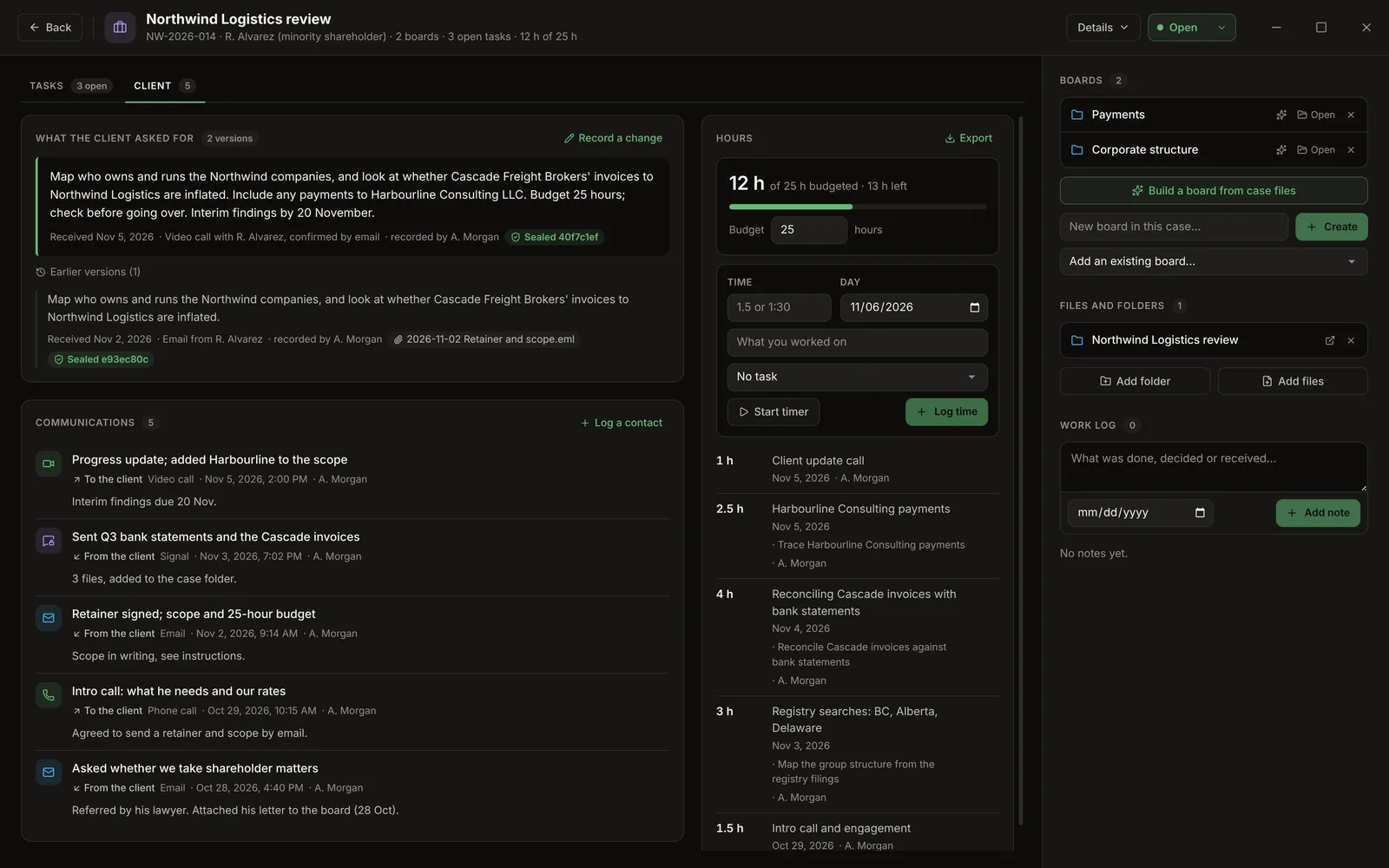
What the client asked for
Record instructions saves:
- the client's request,
- the date it was received,
- How it came in, for example Email from J. Smith, signed engagement letter,
- optionally, the email or letter itself (Attach the email or letter). The file is also added to the case's files.
Recorded instructions can't be edited. When the instructions change, Record a change creates a new version. Earlier versions are listed under Earlier versions.
Sealed versions
Each version is sealed with a SHA-256 fingerprint computed over:
- its text,
- the date received,
- how it came in,
- the attached file's name and SHA-256,
- the previous version's fingerprint.
Because each fingerprint includes the one before it, every version is chained to the previous one. A green Sealed badge shows on each version; hover it for the full hash. If the stored text is ever altered, the badge turns red: Changed since it was recorded.
The attached file's SHA-256 is recorded, so you can show that the original file is the one you received.
These fingerprints are separate from a board's evidence log, since a case can span several boards.
Communications
One place for every contact with the client, whichever app it happened in. Log a contact records:
| Field | Options |
|---|---|
| Channel | Email, Phone call, Video call, In person, Signal, Text or chat, Other |
| Who started it | The client, Me, Not noted |
| When | Date and time |
| What it was about | A short line |
| Notes | Free text |
Contacts are listed newest first. Each can be edited or deleted.
Hours
Log time with:
- a duration, written as
1.5,1:30,90m,2hor1h30, - the day,
- what you worked on,
- optionally, a task from the case.
Start timer runs a timer. It keeps running if you close the case. Stopping it puts the elapsed time into the form.
Budget
Set Budget to the hours the client's budget allows. The panel then shows the hours worked of N h budgeted · X h left (or over), with a bar that turns amber at 80% and red over budget. The case header shows hours worked of the budget.
Exporting hours
Export saves the hours as a CSV for invoicing, with the columns Date, Hours, Description, Task and By, plus a Total row. It opens in Excel.